Short answer
What is happening to Local Services Ads?
Google is moving existing Local Services Ads campaigns into a specialised Performance Max campaign type with pay-per-lead goals. You will still pay for valid leads rather than clicks, and the ads will continue to appear exclusively on Google Search and Google Maps. Campaign management, budgets, bidding and lead handling will move into Google Ads.
Our view
A sensible move, but not merely a name change
Meltzer Media helps local service businesses generate enquiries through Google Ads. We welcome the move to a unified platform. Teams managing Search, Maps and other campaign types will gain a clearer operational home.
Businesses should not treat the transition as passive housekeeping. Historical performance reports will not transfer, bidding changes and the former weekly budget becomes a daily average. Preparation protects your comparison data and reduces avoidable surprises.
Timeline
When will your account migrate?
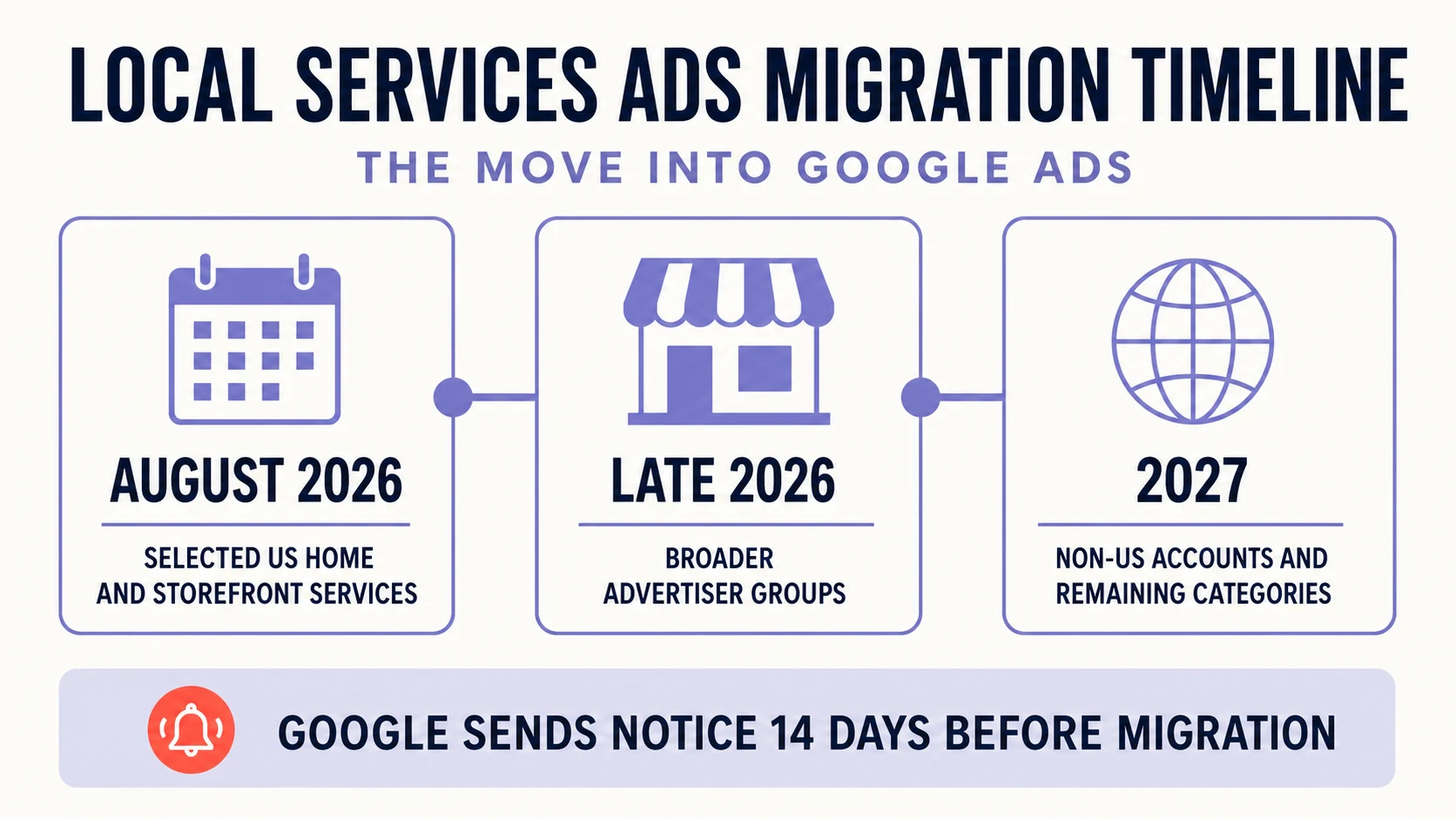
First US categories
Selected home and storefront service advertisers, including plumbing, HVAC, electrical, roofing, cleaning, pest control and moving.
Broader advertiser groups
The transition expands to service-area businesses without storefronts and accounts with custom bidding or booking configurations.
International and remaining accounts
Non-US accounts and all remaining business categories are expected to move into Google Ads.
The account administrator listed on the profile should receive an email and dashboard notice 14 days before migration, followed by another reminder seven days later.
The essential comparison
What stays and what changes?
What stays
- You continue to pay only for valid leads such as calls, messages or bookings.
- Ads continue to appear only on Google Search and Google Maps in the same local positions.
- Targeting remains keywordless and uses service categories, areas and campaign settings.
- Verification status and the Google Verified badge carry over.
What changes
- Budgets, targeting, enquiries and lead communication are managed in Google Ads.
- The historical average weekly budget is divided by seven and becomes an average daily budget.
- Manual bidding and vertical-level target CPA settings within one campaign are deprecated.
- Historical performance reports do not carry into Google Ads.

Most important action
Export your historical reports before migration day
Google will not transfer previous campaign reports covering impressions, leads, spend and ad-level performance into Google Ads. After migration, the former Local Services Ads dashboard will no longer be accessible. Your customer lead history, including contact details, messages and older call recordings, is expected to remain available in the new Lead Manager.
Preparation
Your pre-migration checklist
Treat the advance notice as an action window. Record the current baseline and check the data Google will use for the migrated campaign.
- 1
Back up performance data
Export reports covering spend, leads, cost per lead, impressions and performance over time.
- 2
Check the administrator
Make sure the correct person receives the migration emails and can access both platforms.
- 3
Review the Business Profile
Check the business name, address and opening hours because these details sync into Google Ads.
- 4
Document campaign settings
Record service areas, services, categories, schedule, photos, weekly budget and current bidding targets.
- 5
Plan the category structure
If separate service categories need different target CPAs, plan separate campaigns rather than one shared target.
After the move
What to check immediately in Google Ads
Budget and bidding
Compare the new daily budget with the former weekly budget. The monthly billing limit is based on the daily average multiplied by 30.4.
Targeting
Review service areas, schedule and categories. These settings can be adjusted independently of the Business Profile after migration.
Lead Manager
Under Goals, Conversions and Leads you can review charged leads, lead type, feedback and download options.
Performance
Monitor conversions, cost and cost per conversion. Google advises allowing up to two weeks for performance to stabilise after migration.
Do not confuse the two
Pay-per-lead Performance Max is not standard Performance Max
The migrated campaign uses the Performance Max name but remains a local pay-per-lead product. It serves only on Search and Maps, uses no keywords and charges for valid leads. Standard Performance Max can serve across Search, Shopping, YouTube, Display, Discover, Gmail and Maps and normally charges per click. Google also notes that headlines, videos and sitelinks used in standard Performance Max do not apply to the pay-per-lead campaign type.
FAQ
Common questions about the transition
Can I create the new campaign directly in Google Ads yet?
Not yet. Google currently directs new Local Services campaign creation through g.co/localservices. Direct creation in Google Ads is expected later.
Will my previous leads transfer?
Yes. Google says previous customer contacts, message history and older call recordings will transfer into the new Lead Manager.
Will historical performance reports transfer?
No. Export them from the existing Local Services Ads dashboard before migration day.
Will my ad placements change?
According to Google, no. Ads are expected to continue serving exclusively in the same Search and Maps positions.
Official source
Google’s migration documentation
This article was reviewed on 11 August 2026 against the official Google Ads Help page. Rollout timing, features and requirements can change.
Google Ads Help: Local Services Ads transition to Performance Max campaigns with pay-per-lead goals